

A winter storm shuts the Deerfoot, your bookkeeper cannot get downtown, and the files she needs sit on an office computer.
A dependable remote access solution for small offices turns that kind of day into an ordinary one, because staff reach their own desktops from home. Safety matters as much as convenience: Statistics Canada reports that 15% of small Canadian firms dealt with a cyber incident in 2025.
Small teams rarely have a full IT department to lean on. This guide explains what to compare, how to secure the connection, and how to set it up on your own, with clear checklists you can use today.
Key Takeaways
- The right tool is secure, simple to manage, and works on every device your team uses.
- About one in six Canadian businesses (16%) were hit by cyber incidents.
- Scams and fraud were part of 55% of affected cases, so train staff as well as buy software.
- Multi factor authentication lowered account compromise risk by over 98% in a Microsoft study.
- A short trial beats any feature list on paper.
What Does a Small Calgary Office Need From Remote Access?
The right remote access solution for small offices is secure, easy to administer, and compatible with every device staff use. Most teams want to reach office computers from home, let a support person fix problems, and control who connects.
Smaller teams also lack a full time IT person. That makes simplicity a security feature, because a tool nobody understands tends to be misconfigured.
Core Needs of a Small Office
| Need | Why it matters | What to look for |
|---|---|---|
| Security | Client files are sensitive | MFA, encryption, and session logs |
| Simplicity | No dedicated IT staff | Quick setup and a clear admin panel |
| Device coverage | Staff use laptops and phones | Apps for Windows, Mac, and mobile |
| Reliability | Storms and outages happen | Stable sessions on weak connections |
| Fair pricing | Budgets are tight | Plans that grow with the team |
| Pro Tip: List the five tasks your staff most often do remotely. Test every shortlisted tool on those tasks first. |
How Remote Access Works in a Small Office
The basic idea is simple. Software on your office computer waits for an approved login, and a second app on your laptop or phone sends the request.
- The office computer: It keeps your files and programs, so nothing important sits on a home device.
- The connection: Your screen, keyboard, and mouse commands travel over an encrypted link.
- The login: A password plus a second check confirms who is connecting.
- The record: A log notes each session for later review.
Because files stay at the office, a lost laptop exposes far less than it would with copies stored locally. That single design choice also makes backups and audits easier to manage.
Why Small Offices Cannot Skip Security
Statistics Canada’s survey of 2025 found that 16% of Canadian businesses were affected by cyber incidents, a share unchanged since 2023. Small businesses reported 15%, medium businesses 21%, and large businesses 25%.
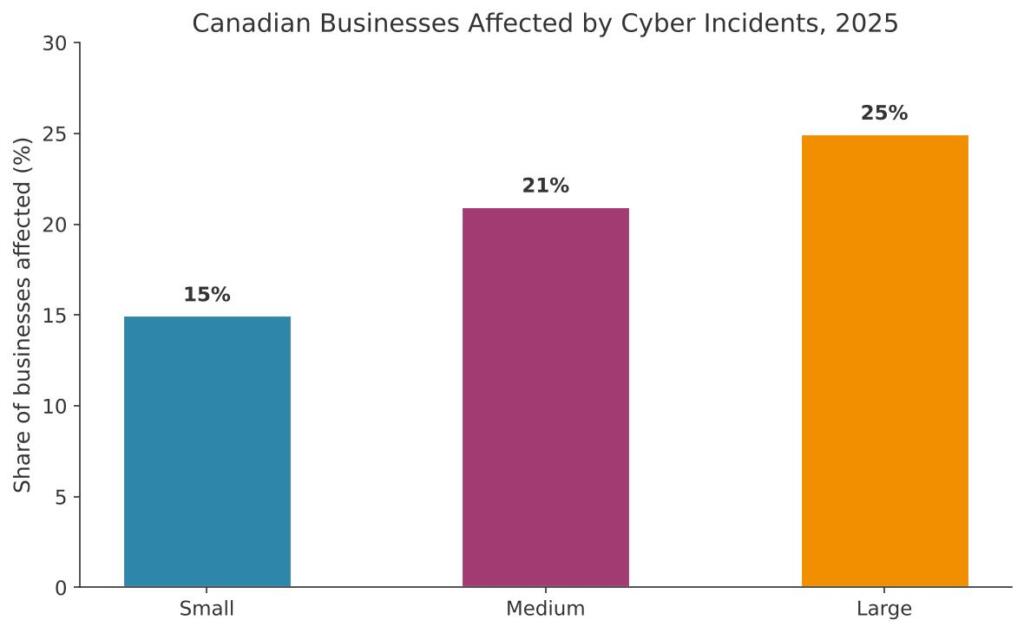
Source: Statistics Canada, Impact of cybercrime on Canadian businesses, 2025
Fraud and scams appeared in 55% of incidents among affected businesses. Ransomware appeared in 8%, and 84% of affected businesses paid no ransom.
| Key Stat: The most common defences in Canada were email security (73%), anti malware software (69%), and network security (67%). |
Comparing Your Remote Access Options
Three approaches suit most small offices. Each has strengths and trade-offs:
Remote Access Options Compared
| Option | Strength | Consideration |
|---|---|---|
| Remote desktop tool | Control a specific computer easily | Needs MFA and careful permissions |
| VPN | Encrypts traffic into the office network | Gives broad access if poorly configured |
| Managed IT provider | Experts run and monitor it | Monthly fee and vendor reliance |
Each remote access VPN connection wraps traffic in an encrypted tunnel between a device and the office network. It does not assess the security health of the device, and home networks may lack protections, so pair it with updates and logging.
Some offices prefer outside help. This article on managed IT services explains how a provider can monitor systems, manage backups, and fix issues early.
What Remote Access Really Costs
Look beyond the monthly price when you budget. Several smaller costs shape the real total:
- Licences: Fees per user or per computer, billed monthly or yearly.
- Setup time: Hours spent installing and testing on each machine.
- Training: A short session so staff connect safely.
- Support: Help when a connection fails on a deadline day.
A slightly higher licence fee can be the cheaper choice when it saves staff hours every week.
A Security Checklist for Small Offices
The Federal Trade Commission’s small business guide recommends these basics for remote work:
- Multi factor authentication: Require a second proof of identity at every login.
- Encrypted Wi-Fi: Use WPA2 or WPA3 and change default router passwords.
- Guest network: Keep visitors off the network that runs your business.
- Full disk encryption: Protect laptops that leave the office.
- Staff training: Teach everyone to spot suspicious messages.
A large Microsoft study found that multi factor authentication cut the risk of account compromise by 98.56% to 99.22%. For more habits to adopt, see these cybersecurity tips for business owners.
| Watch Out: Never open a remote desktop port on the office router to the internet. Exposed connections attract automated attacks. |
Training Your Team to Spot Scams
Software cannot catch every trick, and fraud features in over half of reported incidents. A short training session each quarter pays off.
- Check the sender’s address before opening an unexpected attachment.
- Call a known number to confirm any unusual payment request.
- Never share a login code, even with someone who sounds official.
- Report suspicious messages immediately, even if you have already clicked.
Make reporting easy and blame free. Employees who fear a scolding tend to stay silent, and silence gives attackers more time.
Planning for Calgary Conditions
- Weather days: Make sure every employee can connect from home when roads are poor.
- Internet outages: Keep a phone hotspot as a backup link.
- Office changes: Update access lists when you hire, relocate, or reduce staff.
- Seasonal staff: Give temporary workers limited accounts with an end date.
Growing teams sometimes change premises. If you plan a move, these commercial moving tips may help, and your remote access list should be reviewed at the same time.
Signs You Need Outside Help
- Nobody owns software updates, and they are skipped for months.
- Former employees still appear on the access list.
- Staff share one login to save time.
- You cannot say who connected last week.
Any two of these signs suggest a managed provider or a part time consultant would pay for itself.
How to Choose in Five Steps
- Write your requirements. List devices, users, and tasks.
- Shortlist two or three tools. Compare security and pricing first.
- Trial on real devices. Include a home connection and a phone.
- Test the admin controls. Add a user, restrict access, and review logs.
- Roll out gradually. Start with one team, then expand.
Your First Week With a New Tool
A Simple Launch Schedule
| Day | Task | Who |
|---|---|---|
| Day 1 | Install on two pilot computers and turn on MFA | Office manager |
| Day 2 | Create named accounts and set permissions | Office manager |
| Day 3 | Test from home and from a phone hotspot | Pilot staff |
| Day 4 | Review the session log and fix any gaps | Office manager |
| Day 5 | Brief the whole team and publish the access policy | Owner |
A written one page policy keeps expectations clear for everyone, including new hires. It names who may connect, which devices are allowed, and who removes access when someone leaves.
A short video explains how to create secure remote access policies.
[VIDEO: “How To Create Secure Remote Access Policies?” — https://www.youtube.com/watch?v=qjCGWMmgt00]
The video covers the policy decisions that keep remote connections under control.
Common Questions Answered
What is the best remote access setup for a small office?
A secure tool with multi factor authentication, encryption, device support, simple admin controls, and session logs. Trial two or three options and choose the one your team finds easiest to use.
Is remote access safe for a small business?
Yes, with layered protection: multi factor authentication, current updates, least privilege permissions, and logging. Weak passwords and unpatched software cause most avoidable problems.
Should a small office choose a VPN or remote desktop software?
A VPN connects a device to your network, while remote desktop software controls a specific computer. Some offices use both, depending on who connects and what they need.
How can staff work during a Calgary winter storm?
Set up remote access before storms arrive. Staff open their work desktops from home, and a phone hotspot provides a backup if home internet drops.
Do I need a managed IT provider?
Not always. Small teams with simple needs can run a remote tool themselves. If nobody has time to monitor updates and logs, an outside provider reduces risk.
Keeping the Office Within Reach
A small office does not need an enterprise budget to work safely from anywhere. It needs a short list of requirements, a tool that fits them, and habits that keep every login protected.
Test before you commit, train your people, and review access every few months. Do that, and the next storm becomes just another working day, with clients served and files safe.
References
Statistics Canada, The Daily, Impact of cybercrime on Canadian businesses, 2025, 2026 — https://www150.statcan.gc.ca/n1/daily-quotidien/261021/dq261021b-eng.htm
Meyer et al., How Effective Is Multifactor Authentication at Deterring Cyberattacks?, 2023 — https://arxiv.org/abs/2305.00945
Federal Trade Commission, Secure Remote Access, Cybersecurity for Small Business — https://www.ftc.gov/system/files/attachments/secure-remote-access/cybersecurity_sb_secureremoteaccess.pdf
Cyberglossary, What Is a Remote Access VPN? — https://www.fortinet.com/resources/cyberglossary/remote-access-vpn
Fact Check: All statistics and data points in this article were verified against original sources as of November 10, 2026. Sources are listed in the References section.
About the Author